Create & Manage Order Quantity Rules
The Rules feature allows you to apply specific order quantity restrictions to selected products or collections. This gives you full control over how customers can purchase items from your store.
Access Rules Go to the app dashboard. Click Add Rule. Configure the rule settings below.
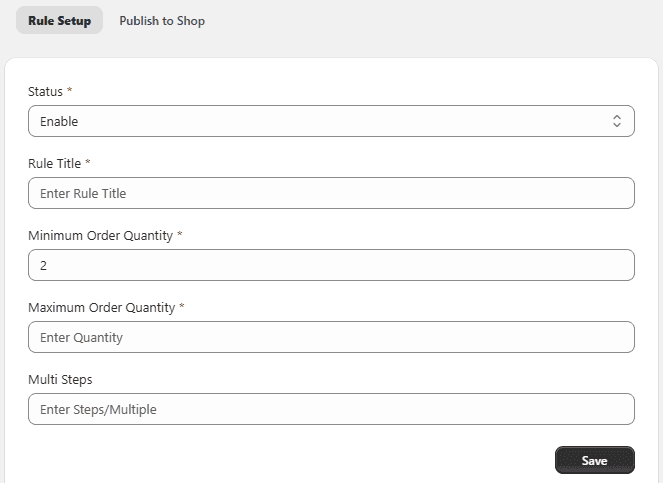
Rule Settings
- Rule Title – Enter a name for the rule
- Minimum Order Quantity – Set minimum quantity
- Maximum Order Quantity – Set maximum quantity
- Steps / Multiple – Restrict quantity in multiples (e.g., 2, 3)
- Status – Enable or disable the rule
Apply Rule to Store
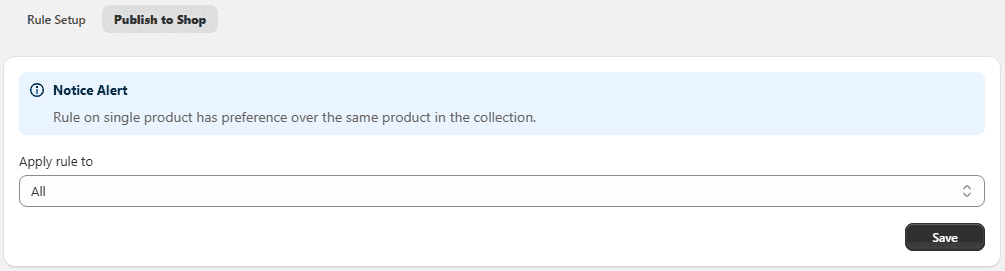
Choose where the rule should apply:
- Products – Select specific products (multiple selection allowed)
- Collections – Apply rule to selected collections
- Rule Category – Apply to product variants or entire collections
Note:
- Product-level rules override collection rules
- If multiple rules apply, the highest priority rule is used
Rule Priority
Set the priority of the rule.
- Lower number = higher priority
- Example: 1 = Highest Priority
Save Rule Click Save to apply the rule.
