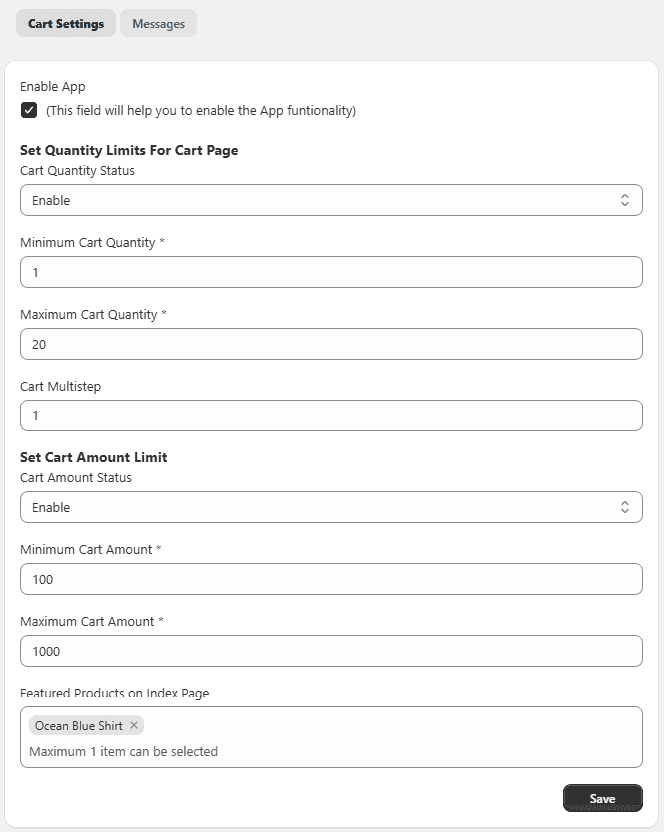
Configure Cart Limits – General Settings
The General Settings section allows you to control minimum and maximum order quantities and cart amounts.
Access General Settings Go to Shopify Admin → Apps → Select the EX Order Limits App → App Configuration → Configure the following settings → Save.
Enable App – Turn ON to activate the order limit functionality.
Cart Quantity Settings Control how many items customers can add to their cart.
- Minimum Cart Quantity – Set the minimum number of items required to place an order.
- Maximum Cart Quantity – Set the maximum number of items allowed in the cart.
- Cart Steps / Multiple – Restrict quantities in multiples (e.g., 2, 3).
- Cart Quantity Status – Enable or disable quantity limits.
Cart Amount Settings Control the total value of the cart.
- Minimum Cart Amount – Set the minimum cart value required for checkout.
- Maximum Cart Amount – Set the maximum cart value allowed.
- Cart Amount Status – Enable or disable cart amount limits.
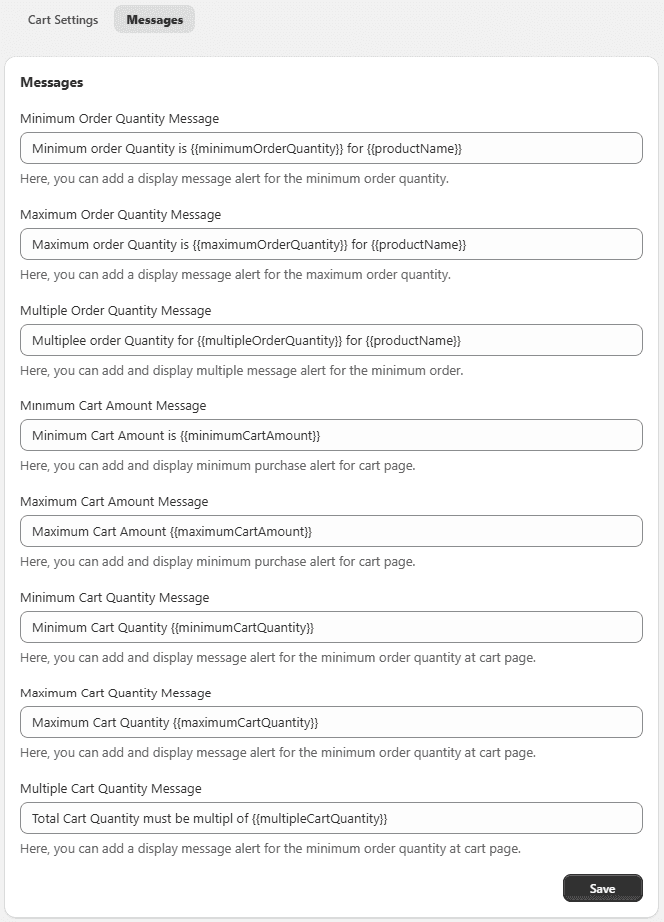
Messages Settings
Customize error messages shown when customers do not meet the rules.
You can use dynamic variables to display values automatically:
- minimumOrderQuantity
- maximumCartAmount
- minimumCartQuantity
- multipleCartQuantity
- productName