Step 2: How to Create Rules
Rules allow you to control quantity limits and behavior.
Add a New Rule Go to the Rules section Click Add Rule Rule Settings
Enable / Disable Activate or deactivate the rule.
Rule Title Enter a name for easy identification.
Minimum Quantity Limit Set the minimum quantity required for purchase.
Maximum Quantity Limit Set the maximum quantity allowed.
Interval (Step Quantity) Define quantity increments (e.g., 1, 2, 3).
Priority Set rule priority when multiple rules apply. (Lower value = higher priority)
Custom Messages
- Minimum Quantity Message – Show when below limit
- Maximum Quantity Message – Show when exceeding limit
Apply Rule To Choose where the rule applies:
- Entire Store
- Specific Products
- Collections
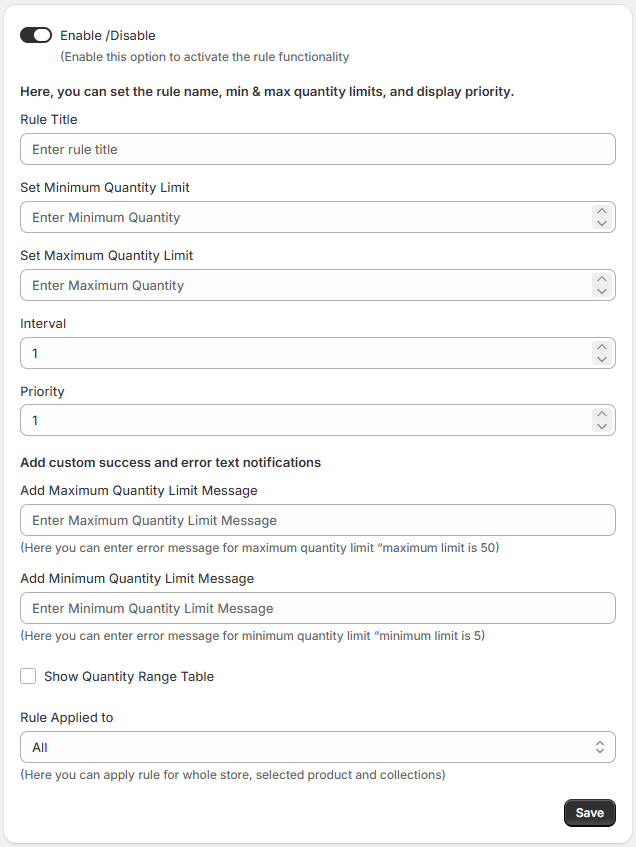
Save Rule Click Save to activate the rule.
