Configure General Settings
In this step, you can enable the app and customize the appearance of the quantity selector.
Access Settings
- Go to Shopify Admin → Apps
- Open the Quantity Selector Button App
- Navigate to General Settings
Enable App Turn ON to activate the quantity selector on product, collection, and cart pages.
Customize Quantity Selector Button
Button Style Choose the design style for increment (+) and decrement (−) buttons.
Button Label Settings
- Label Text – Add custom text
- Text Color – Choose label color
- Font Size – Adjust text size
- Font Style – Select font
Quantity Field Settings
- Background Color – Set field background
- Text Color – Set number color
- Field Width – Adjust width
Button Appearance
- Background Color – Set button color
- Border Color – Define border color
- Border Width – Adjust thickness
Increment & Decrement Buttons
- Increment (+) Color – Highlight increase button
- Decrement (−) Color – Differentiate decrease button
Quantity Text Size Adjust the size of the quantity number for better readability.
Display Settings Choose where to show the quantity selector:
- Product Page
- Collection Page
- Cart Page
- Or apply on all pages
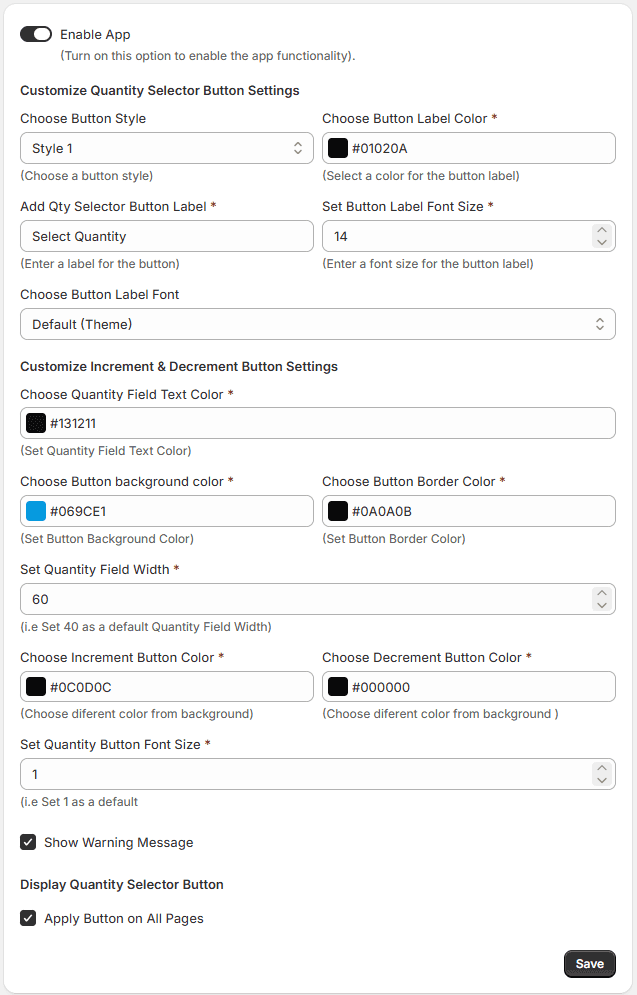
Save Settings Click Save to apply all changes.
