Enable App Embed (Activate App)
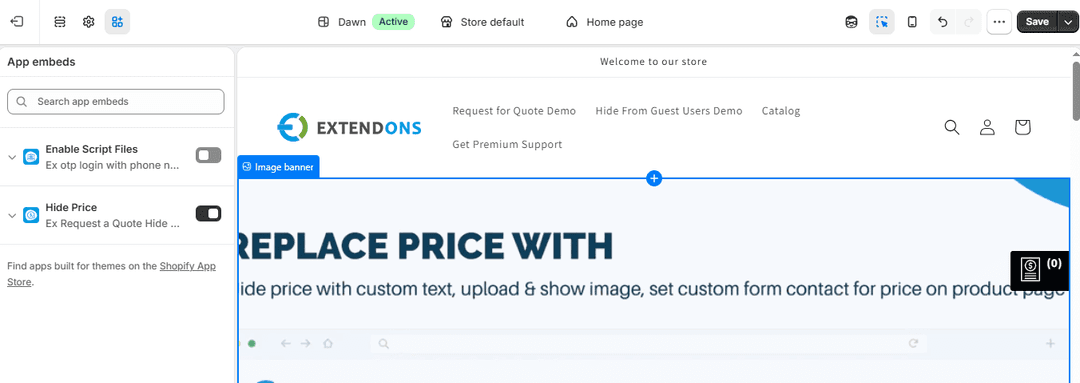
To apply the app on your store, you must enable it in your theme. Steps to Enable App Embed
- Go to Shopify Admin.
- Navigate to Online Store → Themes.
- Click Customize.
- Open Theme Settings → App Embeds.
- Find Hide Price / Add to Quote App..
- Toggle it ON.
- Click Save.
Preview on Store
After setup:
Visit your Online Store. Check product and collection pages. Verify:
- Prices are hidden (if enabled)
- Add to Quote button is visible
- Contact form is working
- Rules are applied correctly
Setup Complete
You have successfully:
- Configured app settings
- Customized contact/quote forms
- Created pricing rules
- Enabled the app on your theme
- Verified functionality on your store
Your store is now ready to handle enquiry-based pricing and improve customer interaction.
