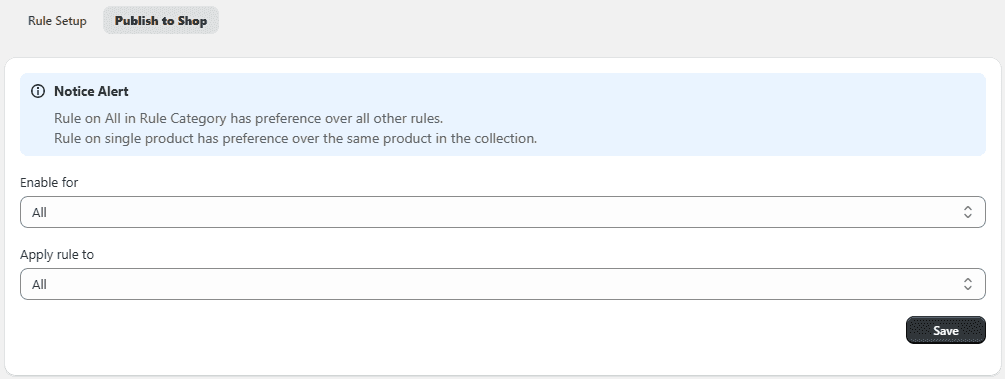
Step 2. Customize Contact / Add to Quote Form
You can fully customize the form fields based on your requirements.
Steps:
- Go to the Contact Form tab.
- Add required fields (e.g., Name, Email, Message).
- Enable or disable field visibility.
- Review all sections.
- Click Save.
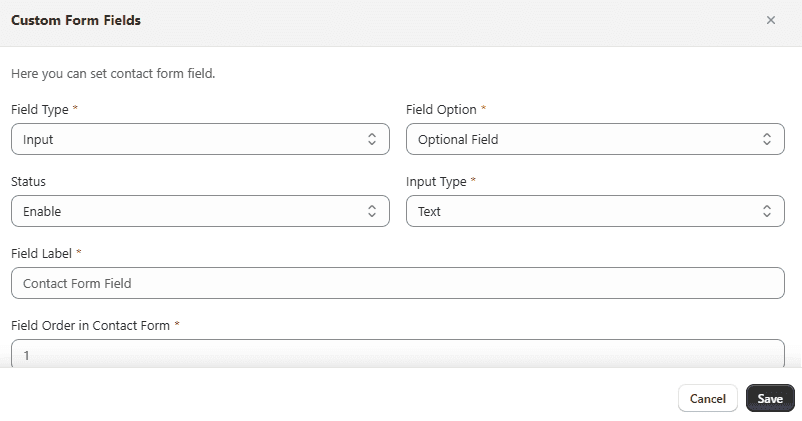
Step 3. Create and Apply Rules
Rules allow you to control where prices are hidden and how they are replaced.
Steps to Create a Rule:
- Click Add Rule in the app dashboard.
- Configure the following:
- Rule Status – Enable or disable the rule
- Rule Title – Enter a name for the rule
- Hide Price – Enable to hide product prices
Choose how to replace hidden prices:
- Custom Text
- Image
- Custom URL
- Phone Number
- Add to Quote Form
- Save the rule.
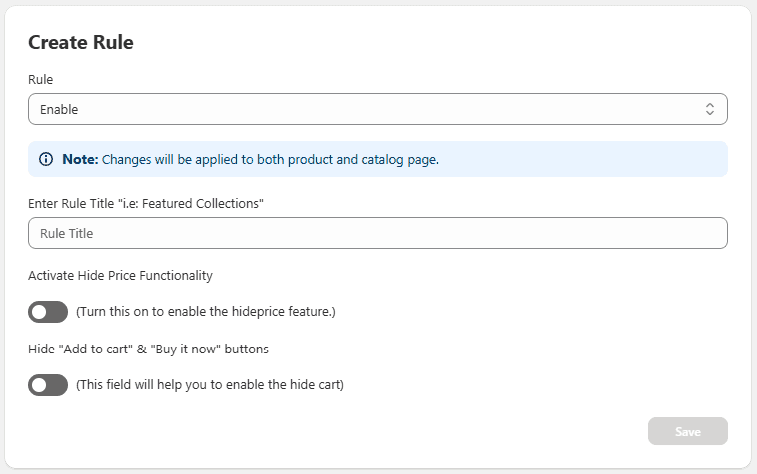
Publish to Shop
Once your rule configuration is complete, use the Apply rule to dropdown to choose where the rule should be applied:
- All
- Product
- Collection
After selecting the desired option, click Save and then Publish to Shop to make the rule active on your storefront.