istockphoto-851396510-640_adpp_is.mp4
Step 1: Configure App – General Settings
The General Settings section allows you to control how products load on your collection pages and how the loading experience appears to customers.
Access General Settings
- Open your Shopify Admin.
- Go to Apps.
- Open the Infinite Scroll / Load More App.
- Click on App Configuration.
- Configure the following options.
- Click Save after making changes.
Enable App – Turn ON to activate the app; turn OFF to use Shopify’s default pagination. Always make sure the app is enabled to use its features.
Loading Type: Click the dropdown menu to select your preferred method for displaying additional products:
- Infinite Scroll: Automatically loads more products as the user scrolls down the page.
- Load More Button: Requires the user to manually click a button to view more products.
Animation Type The Animation Type option allows you to display visual animation effects when new products appear on the page.
Loading Graphic Status The Loading Graphic displays an icon or visual indicator while products are loading.
Uploading a Graphic You can upload a custom loading graphic in SVG format.
SVG files are recommended because they:
- Load quickly
- Maintain high quality on all screen sizes
- Are optimized for web performance
Loading Products Text: Enter the text you wish to display while products are loading. Note: This text will only be visible if the "Loading Graphic Status" is disabled.
Product End Message: Input the message you want your customers to see once they have reached the end of the product list.
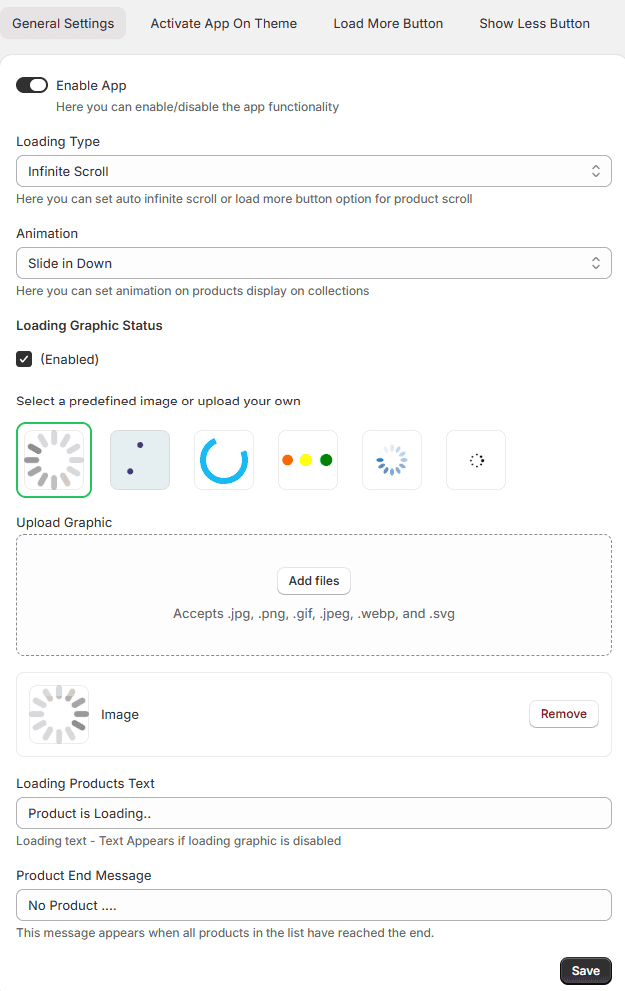
Save Changes: Click the Save button at the bottom right to apply your new settings to your store.