Step 3: How to Create Rules
The Rules feature allows you to apply custom pricing logic to specific products or collections.
To create a new rule:
Go to the Rules tab in the app dashboard and click on "Add Rule."
Once you are in the rule editor, configure the following:
-
Enable Rule: Check this box to activate the specific rule you are creating.
-
Apply VAT To Selected Countries: Check this box if you want the VAT rules to be location-specific. Once enabled, the app will automatically detect your customer's location and apply the corresponding tax display rules accordingly.
-
Rule Title: Enter a name for the rule to easily identify it.
-
Set Price or Percentage: Define pricing adjustments for selected items. Set a fixed price or percentage Apply for VAT included and excluded pricing
-
Rule Applied To: Choose where the rule will be applied:
All Products Specific Products Collections
-
Rule Priority: Set priority when multiple rules apply, Lower values (e.g., 0) have higher priority.
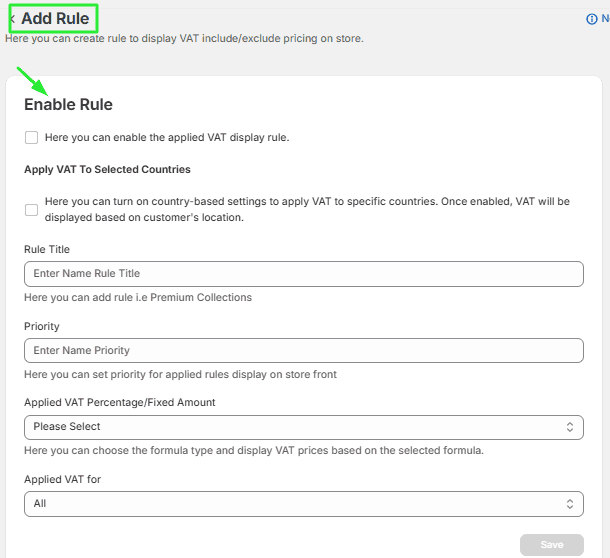
Save Rule Click Save to apply the rule settings.
