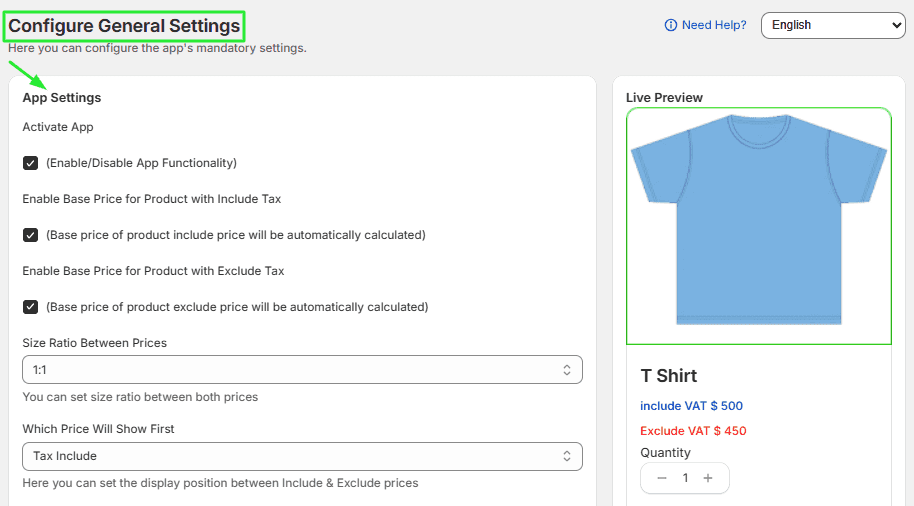
Step 1. Configure App – General Settings
The General Settings section allows you to control how VAT-inclusive and VAT-exclusive prices are displayed on your store.
Access General Settings
- Go to Shopify Admin
- Select the VAT Dual Pricing App
- Click on the Settings tab
- Configure the following options → Save.
Activate App:
Check this box to enable the app’s functionality across your store. If you ever need to revert to default Shopify pricing, simply uncheck this box.
-
Enable Base Price for Product with Include Tax: Check this box to automatically calculate and display the price of your products including VAT.
-
Enable Base Price for Product with Exclude Tax: Check this box to automatically calculate and display the price of your products excluding VAT.
-
Size Ratio Between Prices: Use this field to determine the visual balance between the two prices (e.g., 1:1). This helps maintain a clean, professional look on your product pages.
-
Which Price Will Show First: Use the dropdown menu to decide whether the "Tax Include" or "Exclude Tax" price appears at the top of the price stack.